
iptv for Formuler
Ultimate MyTVOnline IPTV Tutorial – How to Setup YeahIPTV on Formuler (2025)
This powerful tutorial will show you step-by-step how to configure YeahIPTV on your Formuler box using the integrated MyTVOnline app. Whether you’re using MyTVOnline 1, 2, or 3, we’ve got you covered.
– What is MyTVOnline?
MyTVOnline is the official IPTV platform built into all Formuler devices. It delivers a premium streaming experience with:
Super-fast channel switching
Full EPG support
Clean interface for live TV and VOD
Xtream Codes login support
– What You Need Before Setup
- A valid Yeah IPTV subscription (You can getet one here)
- A Formuler box (Z7+, Z8, Z10 Pro Max, etc.)
Your portal URL, username, and password (sent via email after subscribing)
– How to Setup YeahIPTV on MyTVOnline
Step 1 – Launch the App
Open your Formuler device and press the Menu button on your remote.
MyTVOnline 1: Navigate to Portals
MyTVOnline 2: Navigate to Connections
MyTVOnline 3: Go to Content Manager > Content Sources
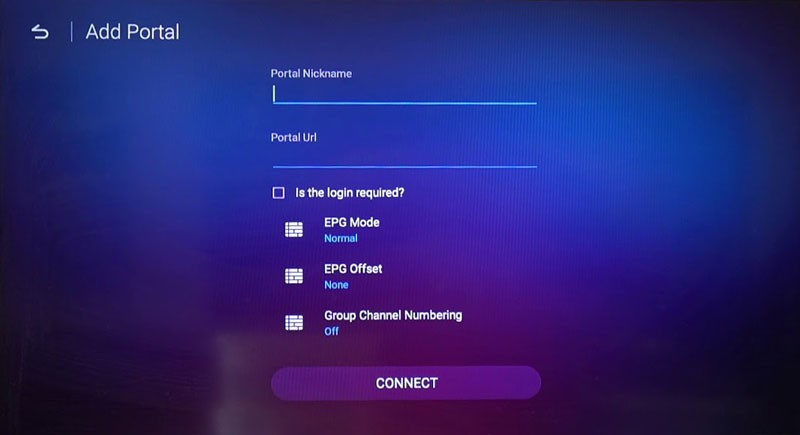
Step 2 – Add a New Portal
Select Add Portal and you’ll see a setup screen.
Fill in the fields as follows:
Portal Nickname: YeahIPTV
Portal URL: Enter the M3U or portal URL from your activation email
✅ Login Required: Check this box to enter Xtream login credentials
User ID: Sent via email
Password: Sent via email
Step 3 – Finalize Connection
Scroll down and click Connect
Wait a few seconds
Your Formuler device will now load the portal
You’ll see your channel groups and EPG ready to stream!
– Why Choose MyTVOnline for IPTV?
⚡ Ultra-fast zapping speed
📺 Smooth EPG and VOD integration
🔁 Easy playlist and portal management
🔒 Secure login via Xtream API
– MyTVOnline Compatibility Chart
MyTVOnline Version |
Compatible Devices |
|---|---|
|
MyTVOnline 1 |
Z7+, Z Nano |
|
MyTVOnline 2 |
Z8, Z Alpha |
|
MyTVOnline 3 |
Z10 Series |
FAQs – MyTVOnline on Formular
Double-check that your login details (URL, user ID, password) are entered correctly.
Yes, MyTVOnline lets you manage and delete multiple connections.
Yes, use a VPN to avoid buffering and protect your connection from ISP throttling.