
GSE Smart IPTV Tutorial: Essential Guide to Set Up Yeah IPTV (2025)
Welcome to the GSE Smart IPTV Tutorial — your essential step-by-step guide to setting up Yeah IPTV on both Android and iOS devices.
Whether you’re using a smartphone, tablet, or iPhone, GSE Smart IPTV is one of the most reliable apps for streaming IPTV services like Yeah IPTV. It supports Xtream Codes, M3U playlists, and has one of the cleanest interfaces available.
This GSE Smart IPTV Tutorial will walk you through how to connect Yeah IPTV in under 5 minutes.
– What is GSE Smart IPTV?
As covered in this GSE Smart IPTV Tutorial, the app is a powerful IPTV player compatible with:
Android phones & tablets
iPhones and iPads (iOS)
Some Android TV devices (via APK sideload)
It works with Xtream Codes API and standard M3U playlists, letting you stream IPTV channels, VOD, and more from Yeah IPTV.
– Requirements:
- A valid Yeah IPTV subscription (You can getet one here)
Your Xtream Codes credentials (sent via email)
GSE Smart IPTV app installed
Internet connection (10 Mbps+ recommended)
– Follow These Steps to Set Up Yeah IPTV on GSE Smart IPTV:
Open your device’s app store (Google Play or Apple App Store).
Search for GSE Smart IPTV and install the app.
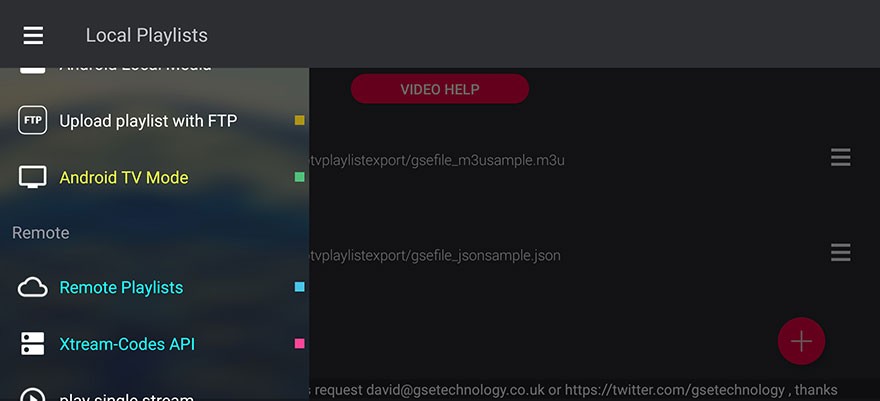
Launch the app and tap the menu icon (three horizontal lines in the top-left).
Scroll down and select Xtream-Codes API.
Tap the red “+” icon in the lower-right corner to add a new login.
Enter the following information:
Yeah IPTV
Server URL (from your email)
Username and Password (from your email)
Tap Add or Login, then wait for the app to connect and load channels.
Once loaded, tap on the Live TV section to start watching.
All channel groups, EPG (TV guide), and categories will appear automatically. You can now browse live channels, VOD content, and more — all from one simple dashboard.
Why Use GSE Smart IPTV with Yeah IPTV?
Compatible with Android & iOS
Works with Xtream Codes (faster than M3U)
Smooth and modern UI
Playlist management and EPG support
Free and easy to use
FAQs – GSE Smart IPTV
Yes, GSE Smart IPTV works on both systems.
o, GSE Smart IPTV has a built-in player that supports almost all streams.
our credentials can be used on any device, but only one can stream at a time.
Xtream Codes API is more stable and recommended over M3U playlists.